
New Open Source Release: n8n Nodes That Run Campaigns, Calls and Faxes From a Workflow
The short version
- Two n8n community nodes are published on npm under the MIT licence: n8n-nodes-ictcontact v0.1.7 and n8n-nodes-ictcore v0.1.2.
- Between them they drive six platforms: ICTContact, ICTDialer.com and ICTBroadcast on one node, ICTFax, ICTPBX and the open source ICTDialer on the other.
- The separate ICTBroadcast package was deprecated on 25 August after n8n pointed out it duplicated an identical API. Existing installs keep working.
- Both are built in GitHub Actions with provenance attached, and both pass n8n's community package scan.
- Neither platform has outbound webhooks, so results come back by polling. The fax operation can wait for you.
You can now start a voice campaign, import a contact list, place a call or send a fax from an n8n workflow without writing a single line of API glue. Two open source nodes went live on npm, one for the Asterisk based contact center products and one for the ICTCore based fax and PBX products, both MIT licensed and both installable from the n8n community nodes screen.
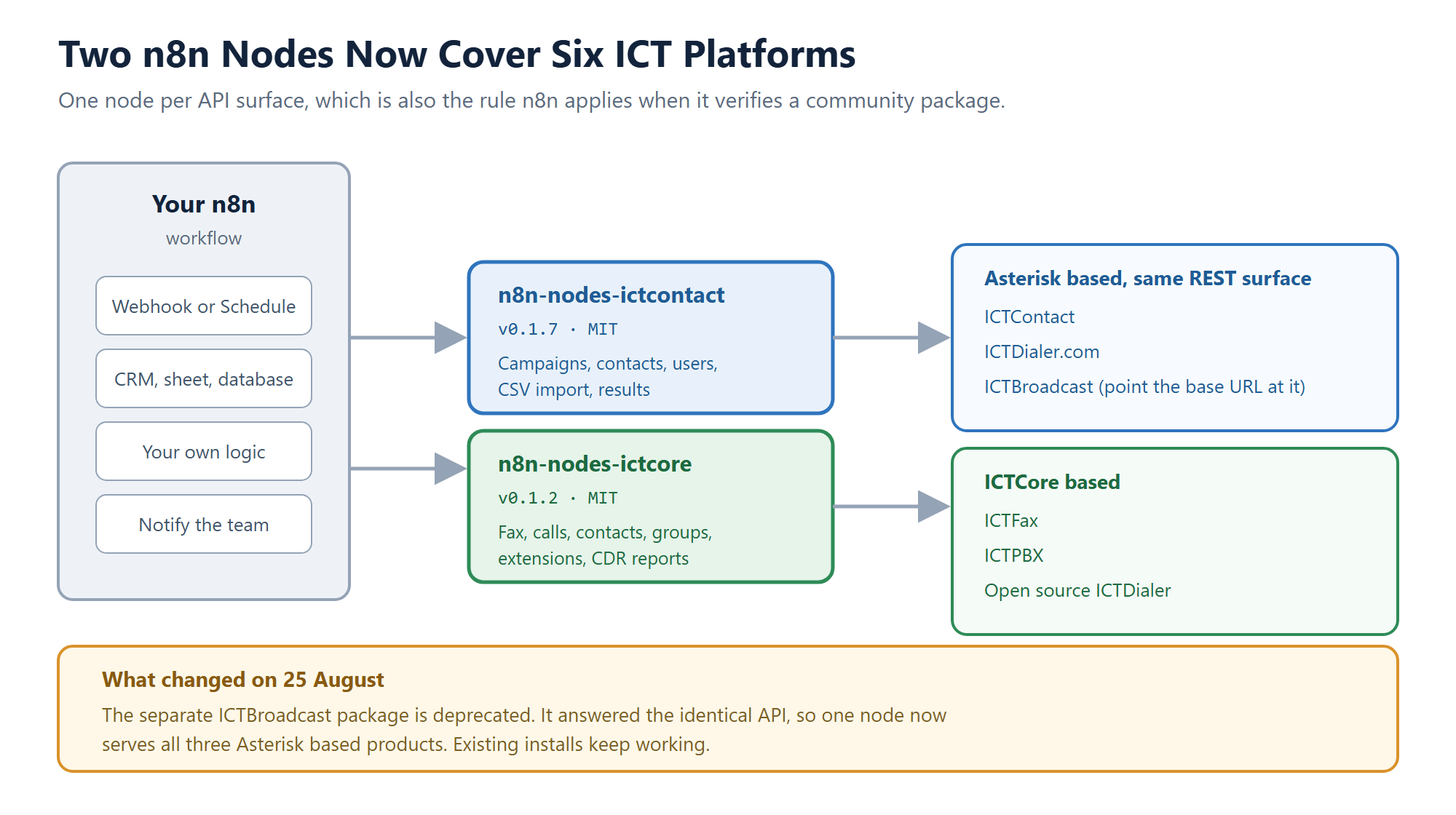
One node per API surface, which happens to be the same rule n8n applies when it verifies a community package.
What each node does
n8n-nodes-ictcontact works against ICTContact, ICTDialer.com and ICTBroadcast. Campaign operations cover Start, Stop, Get Status, Get Summary, Get Result, List, Create Contact and Import Contacts, and the import takes a CSV as binary data straight from an earlier node. Contacts can be created and deleted, and there is a User resource for Create, Update, Get, Delete and List Roles, which matters if you provision agent logins from a signup form.
One thing worth flagging for anyone who has read our API guides: this API is not shaped like REST. Every call is a POST to /rest/<Method_Name> carrying form fields, so the node maps each operation to a method name rather than to a URL path. That design predates the node by years and it works fine, but it does mean a generic HTTP Request node needs more setup than people expect. Removing that friction was most of the point of building this.
n8n-nodes-ictcore covers ICTFax, ICTPBX and the open source ICTDialer, which all sit on the ICTCore framework. It carries more resources because ICTCore does more: Fax with Send, Get Many and Download, Call with Originate and Get Many, full Contact and Group management, Campaign create and control, Transmission operations including Retry and Get Result, an Extension resource for ICTPBX including Get Next Available, and Report operations for CDR and statistics.
The fax operation is the one to look at first
Sending a fax through the raw ICTCore API takes six calls in a fixed order. Create the contact, register the document, upload the file bytes, build a sendfax program, create the transmission, then send it. Miss a step or reorder two of them and you leave orphaned records on the server that somebody has to clean up later.
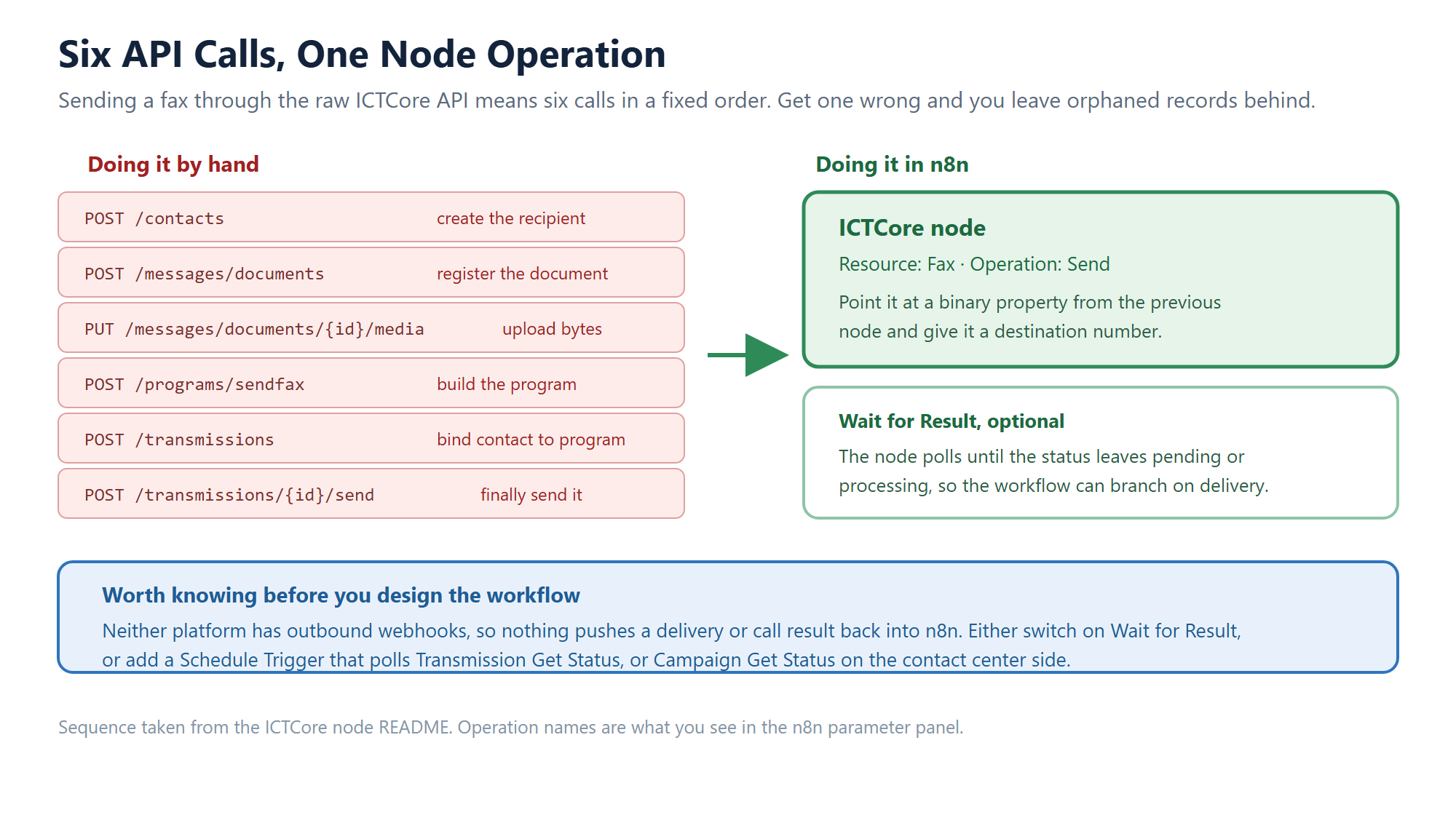
Feed the Send operation a binary property and a destination number, and the sequence runs for you.
The Send operation runs that whole sequence as one node. Point it at a binary property from a Read Binary File, an HTTP Request or an email attachment, give it a number, and you are done. Turn on Wait for Result and the node polls until the status leaves pending or processing, so your workflow can branch on whether the fax actually landed rather than on whether it was accepted for sending. Those are very different things, as anyone who has run a fax server will tell you.
Why the ICTBroadcast package went away
We originally published three nodes. During manual review, n8n came back with a note that ICTContact and ICTBroadcast appeared to be reusing the same API endpoint, and that they support one node per vendor.
We checked before acting, against both live demo servers, and the reviewer was right. The two products expose an identical /rest/ method allow-list, the same method names and the same response envelope, and the two node source files were byte for byte identical apart from the product name. There was no honest way to differentiate them, so the ICTContact node now names ICTBroadcast in its description, keywords, credential help and README, and n8n-nodes-ictbroadcast is deprecated on npm with a message pointing at the replacement.
If you already installed the old package, nothing breaks. It stays on npm and stays installable. When you next touch that workflow, switch to n8n-nodes-ictcontact and set the base URL to your ICTBroadcast server. Every operation behaves the same way.
There are no webhooks, and that shapes your workflow
This is the part I would want to know before designing anything. Neither platform pushes events outward. ICTContact ships a Push Call Status addon, but it is configured per campaign inside the ICTContact interface rather than subscribed to over the API, and ICTCore has no outbound event stream at all.
So build around polling. A Schedule Trigger that calls Campaign Get Status or Transmission Get Status every few minutes covers most cases, and for fax the built in Wait for Result usually saves you the trouble. It is less elegant than an event feed, and it is honest about what the platforms actually do today. Pretending otherwise would just produce workflows that silently never fire.
Installing them
In n8n, open Settings, then Community nodes, then Install, and enter n8n-nodes-ictcontact or n8n-nodes-ictcore. Add a credential with your server base URL, username and password. Both nodes are tested against n8n 1.x and need Node.js 20.15 or newer, which is what n8n itself requires anyway.
Source lives at github.com/ictinnovations/n8n-nodes-ictcontact and github.com/ictinnovations/n8n-nodes-ictcore. Both publish from GitHub Actions with build provenance, so what is on npm is traceable to the commit that produced it. Issues and pull requests are welcome, and a workflow you build with them that you are willing to share is even more welcome.
Where this sits in the rest of the toolkit
These nodes join a run of small open source pieces we have shipped this month for people building on our platforms rather than just running them: the Asterisk AMI and FreeSWITCH ESL clients for Node.js, the pbx-mcp server that lets an AI assistant inspect a PBX, and the Piper TTS server and PHP CRM connectors. Different entry points, same idea: the integration work should already be done by the time you start.
Frequently asked questions
Do these nodes cost anything?
No. Both are MIT licensed and free to install. You need a running ICTContact, ICTBroadcast, ICTDialer, ICTFax or ICTPBX instance to point them at.
Which node do I need for ICTDialer?
It depends which ICTDialer you run. The hosted ICTDialer.com service uses the same API as ICTContact, so use the ICTContact node. The open source ICTDialer on GitHub is built on ICTCore, so use the ICTCore node.
Can a workflow be triggered by an incoming call or a delivered fax?
Not directly, because neither platform sends outbound webhooks. Use a Schedule Trigger with Campaign Get Status or Transmission Get Status, or switch on Wait for Result in the fax Send operation.
I already installed n8n-nodes-ictbroadcast. What now?
Nothing urgent. It still installs and still works. When convenient, replace it with n8n-nodes-ictcontact and set the credential base URL to your ICTBroadcast server, since the operations are identical.
Can I import a contact list from a spreadsheet?
Yes. Campaign Import Contacts takes a CSV as binary data, so a Google Sheets or HTTP Request node upstream can feed it directly. On the ICTCore side, use Group Add Contact for smaller lists.
Related resources
- Asterisk AMI and FreeSWITCH ESL clients for Node.js
- pbx-mcp: an MCP server for Asterisk and FreeSWITCH
- Piper TTS server and 21 PHP CRM connectors
- Five open source SIP libraries worth knowing
- Comparing open source SIP servers
Try it on your own platform
If you already run one of our platforms, install the node that matches it and rebuild your least favourite manual process as a workflow. If you are still choosing, ICT Innovations has been building open source telephony since 2005, and every product named here has a live demo. Questions about a specific automation are best raised through a support ticket, where we can look at your actual setup.